I was travelling on a tram through Manchester during the recent heatwave. Two young women of about the same age were standing by the doors. I was struck by the contrast in their appearance, one wearing shorts and a crop top with long loose shirt over both, the other wearing a hijab and a loose abaya. They were both looking at their phones as they travelled through the city.
Now this is not one of those stories where someone on the tram shouted at one of the women and then someone else defended their right to dress as they pleased to general applause. If anything, the scene seemed so unremarkable that no one but me appeared to have noticed the juxtaposition: it was a great example of the unassuming diversity of modern Manchester.
No, the scene reminded me that we have a tendency to write stories as we want them to be, not as they are.
When I start a story I default to thinking of what I want it to be, not what it is. I have characters in mind, I have places I want them to be and confrontations pencilled in for them somewhere down the line.
The more that I write, the more I’m convinced that this is the wrong way to go about things. I’ve written many times about the importance of following your characters. Put them in a situation and then see how they react to it. When my stories aren’t working its usually because I’ve forgotten my own advice.
The same is true in real life, of course. How often do we listen to what people are really saying and how often do we just impose our own ideas upon them?
(This article was first posted in 2011 – I’ve reposted it following something I heard this week on the radio…)
Over the summer I visited the Zeppelin Museum in Friedrichshafen, a small town by Lake Constance in Southern Germany. The museum was small but well laid out. I’m not going to discuss here what I saw in there as I use that sort of thing in stories, but it was all interesting stuff. All in all a fascinating visit, marred only at the end by something that is all too common now when visiting technical museums. Something that annoys me more and more, something that reduces me to standing in the middle of some room loudly asking:
Why is there an art exhibition?
Why, every time I visit the a museum showing steam engines, industry, aeroplanes, cars, anything vaguely scientific, do I have to have an art exhibition thrust upon me? Don’t misunderstand me, it’s not that I don’t enjoy art galleries, I have even written about them here on occasion. No, what irritates me is the patronising assumption that whilst I’m looking at a history of how things were made, I also need to be culturally educated in some way by second rate artists who couldn’t get their work displayed anywhere else.
Worse, there will be a sign up explaining to me that there is a link between science and art, and this is going to be demonstrated by some painter’s abstract representation of machinery they probably don’t even understand. This annoys me for two reasons. Firstly, you don’t need an artist to show you the link: the form of just about every machine transcends its function – there is a beauty in the shape of those Zeppelins that is owed to more than just aeronautical design. Why not point that out, rather than forcing me to walk through a selection of badly executed paintings before I rejoin the exhibition I came to see? Secondly, if the link between science and art must be expressed, why, on leaving an exhibition of sculpture or ceramic design, do I never see a small display explaining how the internal combustion engine works? Don’t supposedly arty types need educating too?
I am not arguing for a moment there is no link between science and art. Of course there is, although every so often I hear a report on the TV or radio discussing a new artist who is producing revolutionary work combining the two. Is this supposed to be news? I know lots of people who have been doing just that for years.
Four keyboard shortcuts you shouldn’t be without (and one Evernote really should implement…)
Want to know the easiest way to improve your productivity?
Stop using the mouse.
Watch an IT professional and you’ll see that their hands never leave the keyboard. They know that it takes a couple of seconds to move your hand from the keyboard to the mouse, and then to move the mouse to the right position on the screen and click. They know that the bigger the screen, the further the you have to move the mouse and the longer it takes to click.
Learning just a few simple keyboard shortcuts can really speed things up. Here are three shortcuts you can use with Evernote and one that works everywhere.
1: Tab Switch between Applications
The first shortcut is nothing to do with Evernote; it’s something built into Macs, Windows and most Linux desktops
Just suppose you’re surfing the web with your favourite browser (Safari, Chrome, Firefox, Edge) and you want to switch to Evernote to check something.
Don’t reach for the mouse. Hold the Alt key on Windows or the Command (⌘) key on Apple and then press the tab key.
As you press tab you’ll see your current open apps appear on the screen.
Repeatedly press tab until you have selected the app you want to switch to, and then let go.
Tab switching is clever. The apps rearrange themselves every time you tab switch so that the app you last used is only ever one tab away. Try it.
Once you’ve got the hang of this you’ll wonder why you ever used the mouse.
2: Finding a Note in Evernote
You have two choices here:
Either jump to the search bar using Ctrl Command (⌃⌘) E on Mac or Win Shift F on Windows
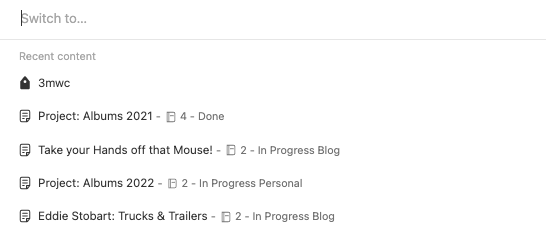
Or press Command (⌘) J on Mac or Ctrl Q on Windows to open the switcher.
The search bar remembers things like which notebook you’re in, the switcher does a fresh Evernote wide search with suggestions
Which is better? Why not try them both out and see which one you like?
If you want a new note: hit Command (⌘) N on Mac or Ctrl N on Windows
3: Finding something within a Note
Now that you’ve found your note, try and find a particular word within it.
First you have to jump to the note editor. Hit tab repeatedly to get to it and then press enter. (It has to be said, Evernote, you could come up with a better way)
After that it’s just Command (⌘) F on a Mac or Ctrl F on Windows to bring up the Find in Note dialog
4: A Bonus Shortcut
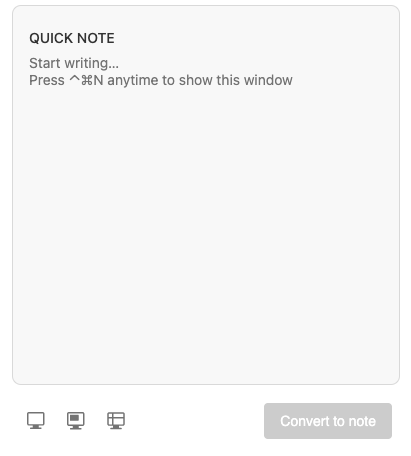
The previous shortcuts help you work in Evernote. But if all you want to do is jot down a quick note there is an even faster way: the helper.
The helper is one of the most underutilised features of the Evernote desktop
Ctrl Cmd (⌃⌘) N on a Mac or Ctrl Alt H on Windows to bring it up. You can add a quick note here. You can even screenshot straight into Evernote
Test Yourself
Practicing the above shortcuts will help to get them into your muscle memory
Follow this link to see a copy of this page as a note. Save it Evernote.
Now, starting in another application see if you can find this elephant without using the mouse
As it says on Wikipedia: Eddie Stobart: Trucks & Trailers is a documentary television programme series exploring the world of the Eddie Stobart haulage company.
My father in law used to watch this program, and I would occasionally watch an episode with him.
If you want to know about story telling, watch this program. The writers were experts at making a drama out of very little. When you’re writing SF it’s easy to create conflict. Destroy a spaceship, a city, an entire planet and let the other side retaliate.
This programme didn’t have the luxury of such exotic material, and yet it somehow contrived to keep viewers on the edge of the seat as we watched a driver attempting to move a load from Leicester to Milton Keynes! A distance of 55 miles! In under 2 hours!
The commentators breathless delivery was such that you could easily forget that 55 miles in 2 hours is an average speed of just under 30 miles an hour. Not that it mattered when a red traffic light could take on the aspect of a major catastrophe.
When storytelling is this effective you might ask yourself Who needs robots? And there is a certain truth that some SF stories get so caught up in the sound and fury they end up signifying nothing. But it’s equally true that I was never moved by an episode of Trucks and Trailers in the same way I was moved by say Slaughterhouse 5...
There’s a post that occasionally does the rounds on the internet challenging beginner writers to describe a woman in a picture. The woman in question would generally perceived to be attractive, the assumption behind the task is that some writers will concentrate on her physical appearance. The challenge is seen by some as a test or a trap.
The post is a good test for beginner writers, though not for the reason some think it is. The reason is that no writer worth their salt would describe a character solely as a list of physical characteristics. No fiction writer, I should say. Fiction writing is about communicating emotion, not recounting facts.
You might be surprised how little physical description is included on books.
Mr Darcy of Pride and Prejudice, one of the most eligible men in fiction is famously described as tall and dark. That’s it. It’s his character, his actions, that make him attractive.
When asked to describe someone in their story, a writer would think about the character first. Are they clever, shy, mean, manipulative, generous? Does anything about their appearance suggest this?
Beauty is subjective, how are you going to make your character attractive to the reader?
A friend of mine – he reads this blog so he’ll know this post is partly about him – always wanted to play the guitar. When it came to his fortieth birthday he decided it was now or never and he bought himself his first instrument.
Fast forward six months and he sat down before us, his work colleagues, and gave a very credible performance of three songs.
He received our compliments and applause with quiet satisfaction.
“See?” he said, “And you all laughed when I said I would learn guitar. You all thought I couldn’t do it!”
It’s a great story, but actually, that wasn’t what happened.
One of our circle is an expert guitarist: he offered a lot of initial advice. We’d all clubbed together to buy a set of guitar lessons as a birthday present and we’d offered nothing but support and encouragement as he learned.
That’s not as good a story, that’s just real life.
I recently watched and enjoyed Only Murders in the Building. Only Murders is a good old fashioned whodunnit. Interestingly – in fact it’s the point of this post – I spotted the murderer right at the beginning.
Not through my detective skills: I have none. Rather, through my writerly skills. I can usually spot the murderer in a whodunit. I recognize the form of the story, the misdirections the writer is using and so on. (In the interests of full disclosure I should admit that I had an advantage as I actually own the obscure item that was a vital clue).
The thing is, I didn’t enjoy the story any less for knowing the answer in advance. When I was a kid I always knew that James Bond was going to defeat the baddies, I still enjoyed the ride.
I enjoyed the ride.
Enjoying the ride is a what a story is all about. It’s very easy when writing stories to get caught up with the making sure the plot is unfolding properly. This especially true in SF when the central idea can be very impressive. One of my favourite SF inventions is Ice 9, in Kurt Vonnegut’s Cat’s Cradle. However, Ice 9 is a conceit, not a story. What makes Cat’s Cradle such a great book is the ride. The cast of characters; the bizarre situations; Vonnegut’s pithy observations and turn of phrase; his compassion and understanding.
It’s been said many times but it’s worth repeating: a story is a journey, not a destination.
Like many people, I imagine, I’ve been thinking of the Handmaid’s Tale over the past week. I think its fair to say that most people read this book as a dystopia, a warning of what would happen if the trends Atwood saw in society in the 80s were taken to their logical conclusion.
It’s now becoming apparent that some people would regard this book as a blueprint. And it occurred to me that, of course, the bad guys read books too. I sometimes think that, as writers, we think that writing is enough. We raise public awareness, we hold a mirror to society, we write solemn warnings.
It turns out that studying to be a lawyer and having your friends get you onto the supreme court is a more effective way of effecting the change you want than simply talking about things.
Blogging and holding up signs just doesn’t do it, I’m afraid.
One of the signs that a story has jumped the shark is when characters who previously couldn’t do so suddenly gain the ability to fly. A story has really jumped the shark when a character suddenly acquires a flying motorbike. (I have no idea why this idea is so popular.) A story has really really jumped the shark when it’s an invisible flying motorbike.
I’m not talking about characters like Superman or Iron Man, they could always fly. I’m not talking about characters like Hagrid who has a flying motorbike at the beginning of the Harry Potter series.
I’m talking about characters who suddenly acquire abilities in order to invigorate a tired plot. This is never a good idea, if nothing else it frequently invalidates previous events.
The point is illustrated in Blood, Sweat and Pixels by Jason Schreier, a book that partly describes the troubled development of the computer game Star Wars 1313. One of the biggest stumbling blocks was the introduction of the character Bobba Fett half way through development. Bobba Fett had a jetpack, which meant that the levels had to be completely redesigned. Objects that were previously out of reach could now be flown up to, for instance.
SF is all about establishing a set of parameters and then exploring them. You can push your world to its limits (in fact, that’s the point of SF) but you can’t change the rules.
Once you’ve built your world you have to stick with it. If you’ve exhausted it, move on.
A big part of writing is putting the notes I’ve made into some sort of order. I spend a lot of time joining notes together to make scenes and then rearranging those scenes. Scrivener is good at the rearranging part (I’ve written about this here.) Where Scrivener falls down is the flexibility of search. Emacs allows me to home in on a scene, an idea or a sentence almost instantly.
I copied some of my writing process from Scrivener’s model, even going as far as writing a simple Emacs Scrivener mode. Doom Emacs has rendered that unnecessary. Tools like ripgrep and consult make it far quicker to find what I’m looking for. If you’re unfamliar with the following commands, try them out. You’ll be pleased that you did.
One last thing. Doom Emacs calls different commands depending on which completion engine you’re using. This means the search syntax may vary. I use the default (vertico at the time of writing) which means that searching for apples oranges will return lines containing apples and oranges. In other words: when searching, type one word for an initial selection, then a second to narrow it down.
10.0.1 Searching in Projects
SPC SPC find file in project
SPC s p search project for text
SPC s P search another project for text
SPC s d search files in directory for text
10.0.2 Searching in Buffers
SPC s s helper function search for text in current buffer. Matches are displayed in another window.
SPC s j helper function that goes to entry in evil’s jump list
SPC m . Jump to org heading (uses consult-org-heading)
And don’t forget
C-c C-j org-goto
10.0.3 Useful Tips
SPC s o Search online. t will search online dictionary, T thesaurus
Find an unmatched quote using this regex ^[^"]*"[^"]*$
10.0.4 M-x consult-ripgrep
For a more flexible search try consult-ripgrep. It’s worth reading the documentation, but here’s a taste:
#alpha beta Search for alpha and beta in any order.
#alpha.*beta Search for alpha before beta.
#\(alpha\|beta\) Search for alpha or beta (Note Emacs syntax!)
#word -- -C3 Search for word, include 3 lines as context
#first#second Search for first, quick filter for second.
I visited my wife’s childhood home last week, clearing out the last few things following the death of her father.
The house lies in a village just off the A55, the main road into north Wales. My family took me on holiday to Wales when I was about 13 years old, and we would have travelled along that road. I sometimes wonder if I saw my wife back then. Perhaps she was walking to the village shop as we drove by. Did we notice each other?
There’s a small possibility. It’s less likely than bumping into people you know whilst on holiday, but there’s a chance. It’s a fascinating thought: think of all the people you might have met in the past and not known it at the time. Future friends, or people who would become famous.
Which brings me to the Time Traveller’s Wife. I read this book years ago (I’ve written about this elsewhere), but recently I’ve been watching the TV series. I was struck by the scene where Henry, the male protagonist, travels back in time as an adult to meet Clare, his future wife, when she was aged 13.
And it struck me that there was no parallel to this situation in real life. It’s possible that I met my wife by chance when she was 13, but I would have been 13 too. There is no situation where I would have the experience of meeting a younger version of her.
In the Time Machine, HG Wells was writing a critique of utopian ideas. In the Sterkarm Handshake by Susan Price, 21st century morals are contrasted with those of a 16th Century Scottish-English Border clan.
I must have enjoyed the Time Traveller’s Wife. After all, I’m watching the series having read the book. I’m just not sure what the point of it is…