Live Notes and Archives

Suppose every year I plan a birthday party for my good friend, Jean Petite.

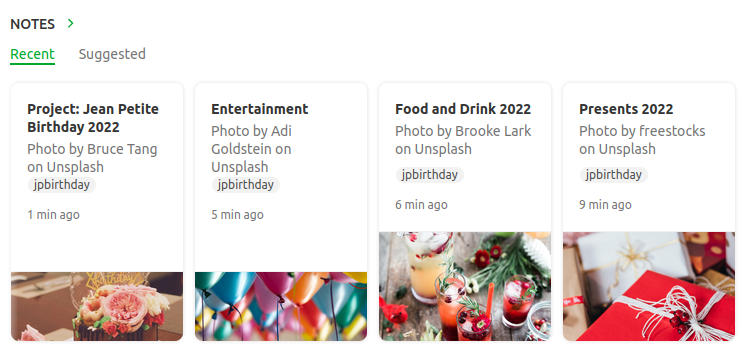
I have separate notes containing lists of presents, guests, food and drink, entertainment and so on.  I also have one master note named Project: Jean Petite Birthday 2022.  All the notes are tagged jpbirthday so I can find them quickly.

The party is a success. Even so, I create a new note outlining what went wells and even better ifs that I can refer to when planning next year’s party.

What happens when next year comes around?  Do I create new notes or use old ones? 

Some notes such as guests will just need to be modified, but others like food and drink may have to be done from scratch. I’ll probably want to create a new note for presents, but retain the old note so I don’t buy the same gift twice.

How do I stop the current notes getting mixed up with the old ones?

One way is to tag the notes by year: 2020, 2021, 2022 and then just filter to this year’s party.

Here’s a better way.

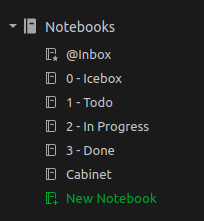
Create the following notebooks (the numbers are there so they appear in the correct order in the sidebar)

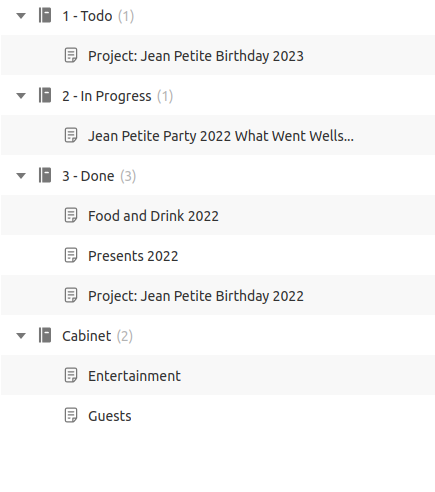
Put this year’s party notes in the In Progress Notebook. Put previous years’ notes in the Done Notebook.  Put reference notes, notes that don’t really change from year to year, in the cabinet.

Notebook View

That way if you want to see this years notes, just filter to In Progress and jpbirthday.  To see only reference notes, filter to Cabinet and jpbirthday.  To see everything, just filter to jpbirthday

The system makes use of the fact that a note can only be in one notebook at a time. Notes can be Todo or In Progress, but never both at the same time. 

A lot of people recommend using tags to represent these states, I think they’re wrong.  I’ve written about that here: You’re Using Folders and Tags the Wrong Way Round

Two more things about this system.

The filtered notes widget works really well with this system.  You can use them to see this year’s party notes at a glance.

And lastly, I used to have a separate Archive Notebook for old notes.  This is no longer needed, they all just go in the Cabinet

Stop tagging your notes with todo and done. Use notebooks.

The Path of a Story

There’s a story that turns up every so often where one of the characters wonders what things would have been like if x hadn’t happened. If they’d never been born; if they’d never met their partner; if they’d never found the item that turned them into a superhero. Some films that spring to mind are It’s a Wonderful Life, Shrek 4 and Sliding Doors.

It’s something I occasionally think about when writing a story, or more usually, rewriting a story. Sometimes when I’m rewrite I think of a good idea and start to include it, only to find I’ve already done it a few pages later. 

I feel as if I’m creating when I write, but how much creation is there? How much of the path of a book is fixed by my experience and personality? As my friend Eric Brown often says, writing is about letting your subconscious take over. Part of becoming a writer is learning how to do that…

I’ve written more about this here: I Used to Worry about Finishing Stories

Todos and Agenda Views

The following post is part of my new Emacs Writing Setup. You can find the complete setup here on GitHub: https://github.com/ballantony/emacs-writing


On my original Emacs Writing Set Up I had this many states:

(setq org-todo-keywords
      (quote ((sequence "TODO(t!)"  "NEXT(n!)" "|" "DONE(d!)")
              (sequence "REPEAT(r)"  "WAIT(w!)"  "|"  "PAUSED(p@/!)" "CANCELLED(c@/!)" )
	      (sequence "IDEA(i!)" "MAYBE(y!)" "STAGED(s!)" "WORKING(k!)" "|" "USED(u!/@)"))))

Now I only have three: TODO, IN PROGRESS and DONE

This is in line with my philosophy that productivity systems are great procrastinators. Thinking of new tagging systems and states for tasks is very absorbing. You can spend hours moving notes around and not doing any work.

Now I capture all my notes as TODOs, I change their state to IN PROGRESS and DONE as projects advance.

Calling org-agenda gives me a bird’s eye view of everything I’m working on. I can then filter down as appropriate.

For convenience, I wrote the following function to restrict the agenda to the current project. ou can see an example in my config.el file

(defun tb/agenda-restrict-this-project ()
    "Restrict agenda to current project"
    (interactive)
    (let ((org-agenda-files (list (projectile-project-root))))
      (org-agenda)))

I rely a lot on this function. When writing I hit SPC j p p (my keybinding: see my config.el file) to see the TODOs and IN PROGRESSes for the current project only.

You can read more in My Doom Emacs Writing Set Up

Cargo Cult Science Fiction

There’s too much Cargo Cult Science Fiction.

 The term “Cargo Cult Science” was first used by physicist Richard Feynman in 1974. It focuses on the superficial rather than the underlying causes.

Cargo Cult Science Fiction is SF built on Cargo Cult Science.  

Now don’t get me wrong. Cargo Cult SF isn’t SF based on imaginary ideas. Some of the great SF novels contain no real science (a classic example is The Stars my Destination by Alfred Bester).

Cargo Cult SF is SF that doesn’t take the science seriously.  In Cargo Cult SF it’s good enough to say something scientific sounding (quantum carburetor anyone?) without exploring the imaginary science further.

In Cargo Cult SF the hero gains superpowers by being bitten by a radioactive vampire bat and no one else in the story thinks to experiment with radioactive tigers, jellyfish or wombats.

In Cargo Cult SF people use time travel to change past events and no one ever thinks to use time travel to change them back again.

In Cargo Cult SF Gaia steps in to save the USA and no one asks what exactly had she been doing when people died in floods and famines in other parts of the world.

If you don’t follow the science, no matter how wild your idea is, you’re not writing SF.

The Machine Stops

Then she generated the light, and the sight of her room, flooded with radiance and studded with electric buttons, revived her. There were buttons and switches everywhere — buttons to call for food, for music, for clothing. There was the hot-bath button, by pressure of which a basin of (imitation) marble rose out of the floor, filled to the brim with a warm deodorized liquid. There was the cold-bath button. There was the button that produced literature. And there were of course the buttons by which she communicated with her friends. The room, though it contained nothing, was in touch with all that she cared for in the world.

The Machine Stops – E. M. Forster

I was reminded of the above story while looking at Wikiquotes. I was struck by just how much the quotation described me using my iPad at the time.

I don’t think it’s the purpose of SF to predict the future. I think that the majority of SF writers would agree with me on this. I think what we’re seeing here is a reflection of our world in Forster’s reflection of his world…

The Professional Side

I’ve written a lot about the tools I use to handle the creative side of writing. But what about the professional side?

It’s a principle of both GTD and Zettelkasten (the two productivity systems I follow) that you keep your reference materials separate from your work. I’ve learned by experience that this is excellent advice.

I’ve had 8 novels and around 70 short stories published. Here’s how I use Evernote to keep track of my writing career.

Story

The basic unit of my writing is a story. I use Evernote to create two notes for every story I begin, one for recording ideas and one for the professional details.

Here’s what goes into a “professional” note.

  • The date I started and finished the story (this is for my own interest.)
  • Dates of revisions, submissions to beta readers
  • Beta readers comments
  • Submission details.

Evernote has recently introduced a tasks feature that is ideal for keeping track of submission deadlines.

Once a story has been placed I add the following to the note:

  • The contract (usually a pdf)
  • Galleys
  • Date of publication, magazine issue (if appropriate)
  • Cover image. This is handy for producing publicity materials.
  • Reviews, quotations
  • Reprint details.

If you’re just starting out as a writer, I’d advise you to begin doing the above with your first sale. If your work is resold, editors want to know these details. Having them to hand will save you a lot of time in the future.

One last thing.

Evernote now allows you to place filtered widgets on your home page. I’ve set up a widget with works in progress or stories currently on submission. I can now see at a glance just what I should be doing.

Bio

I keep several bios on Evernote. A very short one, (22 words), short (60 Words) and longer (over 200 words). They are then when needed, though I usually have to update them at the time. I also have several photos I can download as needed.

Marketing

Evernote allows you to create a shareable page. This is ideal for creating a press release. Here’s an example for my recent novel, Midway.

Income and Expenses

I keep a separate record of sales, payments and residuals on a spreadsheet and I refer to this when doing my tax return. I use tables on Evernote for keeping track of day to day expenses. I keep a note bookmarked for the current tax year so it’s easily accessible.

Markets

I have a note with a list of markets. Evernote tasks are an easy way to keep track of submission windows and deadlines.

Interviews, Panels and Workshops

I may not do as many appearances as I used to, but all my past notes and presentations are stored on Evernote for reference.

Disclosure

I’ve had changing opinions of Evernote over the years (see this post). The new direction the company is taking, plus the addition of a Linux client (currently in Beta) mean I’m once more fully committed to the system, so much so that I’ve recently taken the exams to become an Evernote Expert. I receive a free professional subscription to Evernote. The opinions here are my own.

Capturing and Refiling Notes

The following post is part of my new Emacs Writing Setup. You can find the complete setup here on GitHub: https://github.com/ballantony/emacs-writing

Capturing Notes

Like any writer I’m always capturing ideas. I used to carry a notebook everywhere, now I capture ideas on my phone using either orgzly or Evernote.

When working in Emacs I use org-capture.

GTD means capturing ideas quickly. I used to have templates to capture to different locations, I realised that this was an unnecessary step. Now I either capture everything as a TODO, either directly to my gtd file, or directly to the story file I’m currently working on.

As org-capture requires you to select a template I wrote the following two functions. The first calls org-capture with the ’t’ template preselected, the second does the same but uses let* to change org-capture-templates to the current buffer for the current capture only.

(defun tb/capture ()
    "Capture to do without options"
    (interactive)
    (org-capture nil "t"))

  (defun tb/capture-to-this-buffer ()
    "Capture note to this buffer"
    (interactive)
    (cond  ((not  (eq major-mode 'org-mode))
            (message "Can't capture to non org-mode buffer"))
           (t
            (let* ((this-file buffer-file-name)
                   (org-capture-templates
                    `(("t" "Todo" entry (file+headline ,this-file "Captured")
                       "** TODO %?"))))
              (org-capture)))))

2. Refiling Notes

org-refile makes it easy to refile notes, particularly with a completion system like Vertico. On Doom Emacs this means hitting SPC m r r

Why Doom Emacs?

Way back in September I posted about my new Emacs Writing Set Up: Productivity Overview

Things might have appeared to have gone a little quiet since then. Behind the scenes, however, I’ve been making changes. One of these is to begin the process of moving my Emacs Writing Setup across to GitHub: https://github.com/ballantony/emacs-writing.

I’ll continue to blog relevant content here. Here’s the first, explaining why I’ve adopted Doom Emacs.


Emacs is incredibly configurable. I can choose, for example, the shape and contents of my agenda, the completion engine I use and even such things as the colour of my Todos.

And that’s a problem. Emacs allows me to configure many things that, if I’m honest, I really don’t care about.

It’s very easy to fall into the Emacs trap of sending time configuring the system rather than doing any actual work. I don’t want to think about how many hours I’ve spent experimenting with new packages and thinking of the perfect key bindings when I could have been writing stories instead. GTD can be a powerful procrastinator.

That’s why I’m happy to let someone else do it for me.

Enter Doom Emacs. So what if the TODOs are a different colour to the ones I use, and the capture templates aren’t quite the ones I was using, they’re still good. The key bindings may be different, but they’re far more extensive than any I’ve ever set up and I could probably finish a short story in the time it would take me to replicate them (and I can always override the few I really care about: C-e for example).

Most of all, Henrik Lissner, the creator of Doom Emacs, knows so much more about Emacs than I. I’ve learned so much simply tracking through his code. I wasn’t aware of Vertico until it turned up in the Doom config. I don’t have the time or inclination to try out all new Emacs packages. It’s great that someone else is doing this, and if I don’t like their choices, well, Doom is flexible enough for me to change them.

One final observation. Doom Emacs is fast to load. This is important to me. I like to take notes or begin writing when inspiration strikes. I can open Doom Emacs (or Orgzly on my mobile phone) and take a note in the time it takes apps such as Evernote or Notion to load.

The Muppets Christmas Carol

As anyone who has seen it will attest, the Muppet’s Christmas Carol is the definitive version of the story. Dickens’s version, whilst competent, fails in a number of rather obvious areas. These include only having one Marley and glossing over the role played by Rizzo the Rat. Worst of all, he neglected to write a number of songs that sound good being sung by Kermit the Frog; Statler and Waldorf; and, hardest of all, Michael Caine.

I’ve watched the film every Christmas practically since it came out. However, when I heard that the Bridgewater Hall in Manchester was screening the film accompanied by a live orchestra I must admit I was confused.

Who’s idea was that, I wondered? Who looked out the movie score? Who put together the click track for the conductor to play along with? Who thought people would pay money to see something that airs for free on TV every December.

Whoever they were, they knew what they were doing. The hall was packed with families. When I say families, I should point out I saw about three actual youngsters there. Most of the children in the families present were now adults, my own two included.

Did the addition of live music add anything to the film? If I’m honest, I kept forgetting there was an orchestra present until someone made a mistake. The music was too loud, it tended to drown the speaking.

But that didn’t matter. Everyone knew the dialog. Not only that, they sang along quite happily.

So it was a great show, though not for the reason I was expecting. When I booked the tickets part of my motivation was to support an orchestra, not out of any idea that orchestras need protecting, but because I like orchestras and if no one goes then they’ll stop playing.

But this wasn’t about the orchestra. It wasn’t about the music. It was all about the feeling of community.

The Muppets Christmas Carol accompanied by a live orchestra. Surely this must be the cultural event of the year.