The Time Traveller’s Wife

I visited my wife’s childhood home last week, clearing out the last few things following the death of her father.

The house lies in a village just off the A55, the main road into north Wales. My family took me on holiday to Wales when I was about 13 years old, and we would have travelled along that road. I sometimes wonder if I saw my wife back then. Perhaps she was walking to the village shop as we drove by. Did we notice each other?

There’s a small possibility. It’s less likely than bumping into people you know whilst on holiday, but there’s a chance. It’s a fascinating thought: think of all the people you might have met in the past and not known it at the time. Future friends, or people who would become famous.

Which brings me to the Time Traveller’s Wife. I read this book years ago (I’ve written about this elsewhere), but recently I’ve been watching the TV series. I was struck by the scene where Henry, the male protagonist, travels back in time as an adult to meet Clare, his future wife, when she was aged 13.

And it struck me that there was no parallel to this situation in real life. It’s possible that I met my wife by chance when she was 13, but I would have been 13 too. There is no situation where I would have the experience of meeting a younger version of her.

In the Time Machine, HG Wells was writing a critique of utopian ideas. In the Sterkarm Handshake by Susan Price, 21st century morals are contrasted with those of a 16th Century Scottish-English Border clan.

I must have enjoyed the Time Traveller’s Wife. After all, I’m watching the series having read the book. I’m just not sure what the point of it is…

Your Day on a Page

For many people, going to College means freedom. Freedom to try new things, to do what you like, when you like.

Well, not quite.

You’re still going to have  lectures and tutorials to attend (that’s why you’re going, remember?)  You want to make sure that you know what you’re doing every day, so that you can really enjoy your free time without worrying that you’re behind on an assignment.

That’s where Evernote can help you.

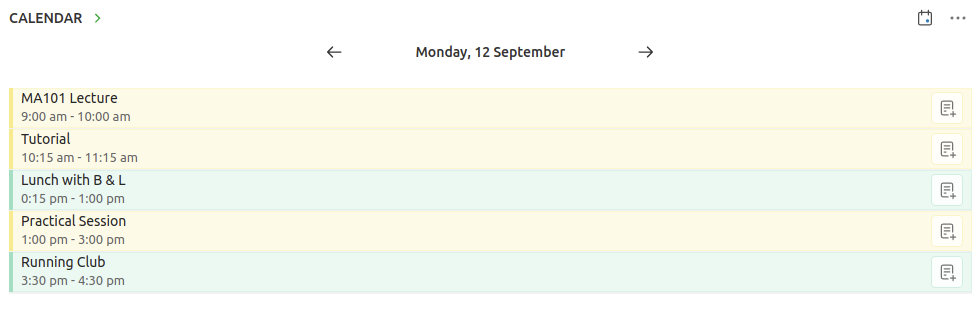
Evernote Home gives you your day on a page. Front and center should be your calendar. Your calendar will tell you where you need to be and when. Lectures, tutorials, practicals…

Setting up a calendar with all those details can be tedious. The good news is that 99% of the time your college will have your timetable already prepared and will share it with you via Google Calendar or Outlook. 

You can view that calendar on your home page on Evernote.  Here’s how you can add a Google Calendar. Evernote doesn’t support Outlook Calendar integration yet, but you can subscribe to your Outlook Calendar from your Gmail account. Scroll to the bottom of the page to see how.

Add your college calendar and when you open up Evernote in the morning you’ll have your day on a page before you.

But there’s more.

Searching is easy on Evernote, but why search when you can have the right notes appear at the right time?

Here’s a tip: link your study notes to your individual events.

Just suppose you’ve created a note with the materials you need for tomorrow’s 9am tutorial.  Link that note to the tutorial on the calendar on your Home Page. Here’s how to add link notes to calendar events.  Now the note will be there, just when you need it.

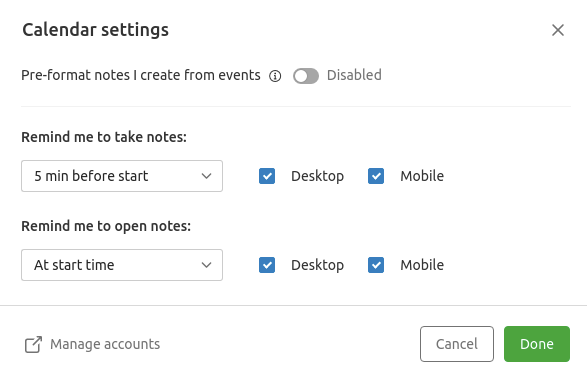
You can even get Evernote to remind you to open the notes as the lecture begins. Just go to Calendar settings (click the dots on the top right of the calendar widget).

If I only had two pieces of advice for people heading of to college, the above would be one of them. Follow this link to see the other…

Using Outlook

Using Outlook?  You can subscribe to your Outlook Calendar from your Gmail account, if your college allows you to share calendars.

  1. Go to Outlook and click on Settings (the cogwheel in the top right hand corner)
  2. Click on View all Outlook settings at the bottom
  3. Choose Calendar
  4. Choose Shared Calendars, just below Events from email. If Shared Calendars doesn’t appear then bad news, you’re college won’t allow this.
  5. Go to Publish a calendar and choose the calendar you want to share. Hit publish and copy the ICS link.  You
  6. Now open your Google Calendar
  7. Click on Cogwheel and Settings in the top right
  8. Choose Add Calendar and then From URL
  9. Enter the ICS link you copied earlier

The Right Stuff

Someone said that a Science Fiction story was one that wouldn’t work if you removed the science element

I was struck by this watching an episode of the Right Stuff on Disney+. The opening scene deals with the would be astronauts discussing a friend who has just “flamed out”: been killed in a test flight. The characters drink whisky around a fire, they speak in low voices, they shake their heads and look serious as they reflect on the noble mission they are undertaking.

It’s am interchangeable scene that could have appeared in many stories.

Compare that with opening of Tom Wolfe’s original novel. A test pilot has been killed but which one? The tension is raised as the wives phone each other, trying to determine who it could be. The identity of the pilot is revealed.

And then, something different. Rather than nobly reflecting on the tragedy, the other pilots try to determine the cause of the accident. As always, they decide it was pilot error. It wasn’t down to chance, it was something that could have been avoided if the pilot did their job properly. It seems heartless, but that’s how the other pilots maintain their sanity, that’s how they handle the uncertainty of the job.

The Right Stuff novel was Science Fact, not Science Fiction, but like good SF it respected its subject matter, it didn’t just throw standard story elements at a setting and waited to see what would stick.

Incidentally, I seem to remember the opening quotation was by Fred Pohl. I had a look online to check but I couldn’t find it. I did find this rather nice line though:

“Someone once said that a good science-fiction story should be able to predict not the automobile but the traffic jam. We agree”.

Frederik Pohl, 1968.

Live Notes and Archives

Suppose every year I plan a birthday party for my good friend, Jean Petite.

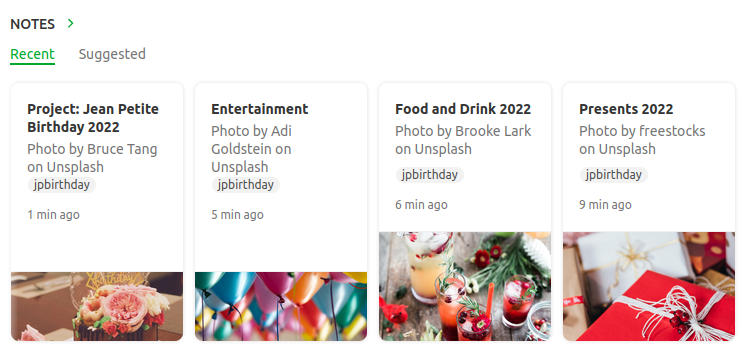
I have separate notes containing lists of presents, guests, food and drink, entertainment and so on.  I also have one master note named Project: Jean Petite Birthday 2022.  All the notes are tagged jpbirthday so I can find them quickly.

The party is a success. Even so, I create a new note outlining what went wells and even better ifs that I can refer to when planning next year’s party.

What happens when next year comes around?  Do I create new notes or use old ones? 

Some notes such as guests will just need to be modified, but others like food and drink may have to be done from scratch. I’ll probably want to create a new note for presents, but retain the old note so I don’t buy the same gift twice.

How do I stop the current notes getting mixed up with the old ones?

One way is to tag the notes by year: 2020, 2021, 2022 and then just filter to this year’s party.

Here’s a better way.

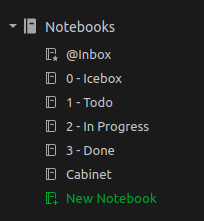
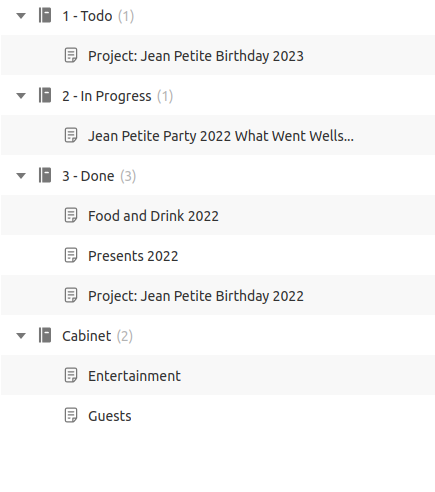
Create the following notebooks (the numbers are there so they appear in the correct order in the sidebar)

Put this year’s party notes in the In Progress Notebook. Put previous years’ notes in the Done Notebook.  Put reference notes, notes that don’t really change from year to year, in the cabinet.

Notebook View

That way if you want to see this years notes, just filter to In Progress and jpbirthday.  To see only reference notes, filter to Cabinet and jpbirthday.  To see everything, just filter to jpbirthday

The system makes use of the fact that a note can only be in one notebook at a time. Notes can be Todo or In Progress, but never both at the same time. 

A lot of people recommend using tags to represent these states, I think they’re wrong.  I’ve written about that here: You’re Using Folders and Tags the Wrong Way Round

Two more things about this system.

The filtered notes widget works really well with this system.  You can use them to see this year’s party notes at a glance.

And lastly, I used to have a separate Archive Notebook for old notes.  This is no longer needed, they all just go in the Cabinet

Stop tagging your notes with todo and done. Use notebooks.

The Path of a Story

There’s a story that turns up every so often where one of the characters wonders what things would have been like if x hadn’t happened. If they’d never been born; if they’d never met their partner; if they’d never found the item that turned them into a superhero. Some films that spring to mind are It’s a Wonderful Life, Shrek 4 and Sliding Doors.

It’s something I occasionally think about when writing a story, or more usually, rewriting a story. Sometimes when I’m rewrite I think of a good idea and start to include it, only to find I’ve already done it a few pages later. 

I feel as if I’m creating when I write, but how much creation is there? How much of the path of a book is fixed by my experience and personality? As my friend Eric Brown often says, writing is about letting your subconscious take over. Part of becoming a writer is learning how to do that…

I’ve written more about this here: I Used to Worry about Finishing Stories

Todos and Agenda Views

The following post is part of my new Emacs Writing Setup. You can find the complete setup here on GitHub: https://github.com/ballantony/emacs-writing


On my original Emacs Writing Set Up I had this many states:

(setq org-todo-keywords
      (quote ((sequence "TODO(t!)"  "NEXT(n!)" "|" "DONE(d!)")
              (sequence "REPEAT(r)"  "WAIT(w!)"  "|"  "PAUSED(p@/!)" "CANCELLED(c@/!)" )
	      (sequence "IDEA(i!)" "MAYBE(y!)" "STAGED(s!)" "WORKING(k!)" "|" "USED(u!/@)"))))

Now I only have three: TODO, IN PROGRESS and DONE

This is in line with my philosophy that productivity systems are great procrastinators. Thinking of new tagging systems and states for tasks is very absorbing. You can spend hours moving notes around and not doing any work.

Now I capture all my notes as TODOs, I change their state to IN PROGRESS and DONE as projects advance.

Calling org-agenda gives me a bird’s eye view of everything I’m working on. I can then filter down as appropriate.

For convenience, I wrote the following function to restrict the agenda to the current project. ou can see an example in my config.el file

(defun tb/agenda-restrict-this-project ()
    "Restrict agenda to current project"
    (interactive)
    (let ((org-agenda-files (list (projectile-project-root))))
      (org-agenda)))

I rely a lot on this function. When writing I hit SPC j p p (my keybinding: see my config.el file) to see the TODOs and IN PROGRESSes for the current project only.

You can read more in My Doom Emacs Writing Set Up

Cargo Cult Science Fiction

There’s too much Cargo Cult Science Fiction.

 The term “Cargo Cult Science” was first used by physicist Richard Feynman in 1974. It focuses on the superficial rather than the underlying causes.

Cargo Cult Science Fiction is SF built on Cargo Cult Science.  

Now don’t get me wrong. Cargo Cult SF isn’t SF based on imaginary ideas. Some of the great SF novels contain no real science (a classic example is The Stars my Destination by Alfred Bester).

Cargo Cult SF is SF that doesn’t take the science seriously.  In Cargo Cult SF it’s good enough to say something scientific sounding (quantum carburetor anyone?) without exploring the imaginary science further.

In Cargo Cult SF the hero gains superpowers by being bitten by a radioactive vampire bat and no one else in the story thinks to experiment with radioactive tigers, jellyfish or wombats.

In Cargo Cult SF people use time travel to change past events and no one ever thinks to use time travel to change them back again.

In Cargo Cult SF Gaia steps in to save the USA and no one asks what exactly had she been doing when people died in floods and famines in other parts of the world.

If you don’t follow the science, no matter how wild your idea is, you’re not writing SF.

The Machine Stops

Then she generated the light, and the sight of her room, flooded with radiance and studded with electric buttons, revived her. There were buttons and switches everywhere — buttons to call for food, for music, for clothing. There was the hot-bath button, by pressure of which a basin of (imitation) marble rose out of the floor, filled to the brim with a warm deodorized liquid. There was the cold-bath button. There was the button that produced literature. And there were of course the buttons by which she communicated with her friends. The room, though it contained nothing, was in touch with all that she cared for in the world.

The Machine Stops – E. M. Forster

I was reminded of the above story while looking at Wikiquotes. I was struck by just how much the quotation described me using my iPad at the time.

I don’t think it’s the purpose of SF to predict the future. I think that the majority of SF writers would agree with me on this. I think what we’re seeing here is a reflection of our world in Forster’s reflection of his world…

The Professional Side

I’ve written a lot about the tools I use to handle the creative side of writing. But what about the professional side?

It’s a principle of both GTD and Zettelkasten (the two productivity systems I follow) that you keep your reference materials separate from your work. I’ve learned by experience that this is excellent advice.

I’ve had 8 novels and around 70 short stories published. Here’s how I use Evernote to keep track of my writing career.

Story

The basic unit of my writing is a story. I use Evernote to create two notes for every story I begin, one for recording ideas and one for the professional details.

Here’s what goes into a “professional” note.

  • The date I started and finished the story (this is for my own interest.)
  • Dates of revisions, submissions to beta readers
  • Beta readers comments
  • Submission details.

Evernote has recently introduced a tasks feature that is ideal for keeping track of submission deadlines.

Once a story has been placed I add the following to the note:

  • The contract (usually a pdf)
  • Galleys
  • Date of publication, magazine issue (if appropriate)
  • Cover image. This is handy for producing publicity materials.
  • Reviews, quotations
  • Reprint details.

If you’re just starting out as a writer, I’d advise you to begin doing the above with your first sale. If your work is resold, editors want to know these details. Having them to hand will save you a lot of time in the future.

One last thing.

Evernote now allows you to place filtered widgets on your home page. I’ve set up a widget with works in progress or stories currently on submission. I can now see at a glance just what I should be doing.

Bio

I keep several bios on Evernote. A very short one, (22 words), short (60 Words) and longer (over 200 words). They are then when needed, though I usually have to update them at the time. I also have several photos I can download as needed.

Marketing

Evernote allows you to create a shareable page. This is ideal for creating a press release. Here’s an example for my recent novel, Midway.

Income and Expenses

I keep a separate record of sales, payments and residuals on a spreadsheet and I refer to this when doing my tax return. I use tables on Evernote for keeping track of day to day expenses. I keep a note bookmarked for the current tax year so it’s easily accessible.

Markets

I have a note with a list of markets. Evernote tasks are an easy way to keep track of submission windows and deadlines.

Interviews, Panels and Workshops

I may not do as many appearances as I used to, but all my past notes and presentations are stored on Evernote for reference.

Disclosure

I’ve had changing opinions of Evernote over the years (see this post). The new direction the company is taking, plus the addition of a Linux client (currently in Beta) mean I’m once more fully committed to the system, so much so that I’ve recently taken the exams to become an Evernote Expert. I receive a free professional subscription to Evernote. The opinions here are my own.

Capturing and Refiling Notes

The following post is part of my new Emacs Writing Setup. You can find the complete setup here on GitHub: https://github.com/ballantony/emacs-writing

Capturing Notes

Like any writer I’m always capturing ideas. I used to carry a notebook everywhere, now I capture ideas on my phone using either orgzly or Evernote.

When working in Emacs I use org-capture.

GTD means capturing ideas quickly. I used to have templates to capture to different locations, I realised that this was an unnecessary step. Now I either capture everything as a TODO, either directly to my gtd file, or directly to the story file I’m currently working on.

As org-capture requires you to select a template I wrote the following two functions. The first calls org-capture with the ’t’ template preselected, the second does the same but uses let* to change org-capture-templates to the current buffer for the current capture only.

(defun tb/capture ()
    "Capture to do without options"
    (interactive)
    (org-capture nil "t"))

  (defun tb/capture-to-this-buffer ()
    "Capture note to this buffer"
    (interactive)
    (cond  ((not  (eq major-mode 'org-mode))
            (message "Can't capture to non org-mode buffer"))
           (t
            (let* ((this-file buffer-file-name)
                   (org-capture-templates
                    `(("t" "Todo" entry (file+headline ,this-file "Captured")
                       "** TODO %?"))))
              (org-capture)))))

2. Refiling Notes

org-refile makes it easy to refile notes, particularly with a completion system like Vertico. On Doom Emacs this means hitting SPC m r r