Seduced by Productivity

I feel that I’ve been seduced by productivity. 

It’s been a gradual process. It began when I discovered GTD. At the time I was swamped with work. I constantly felt there was something else more important that I should be doing. GTD reassured me that I wasn’t neglecting anything, it organised my life. You can implement GTD with a pen and paper. I used Emacs.

That’s where the seduction began. You see, Emacs is just too useful. You can use it for everything, and for years I did. I used Emacs for everything from writing novels to reminding me to chase people for returns at work. It was my calendar, my project planner, my note taking system, everything. 

But slowly I started to introduce other applications into my workflow. Like most people, I spend a lot of my time away from my desktop computer and so I had gradually moved some of my work onto Evernote and Todoist: apps that work well in a web browser or an a mobile phone.   

I spent most of 2020 at my desk: it will probably be the last year that I use Emacs for everything. Emacs remains a powerful, flexible tool that I will use for many aspects of my writing, tech and personal life, however despite such excellent applications as Orgzly and Beorg (both of which I use), there’s no getting away from the fact that Emacs works best as a desktop application.   

I’ve had a love/hate relationship with Evernote for years. I currently love it and the direction it’s going, but therein lies the problem. Like Emacs, Evernote is getting just too useful.

I’ve heard it said that before there were washing machines and vacuum cleaners people were content to wash and clean much less frequently. New technology made these tasks easier and so people did them more often.

It’s the same with tools like Emacs and Evernote and Todoist. They mean I can be more productive, and so I am.

But since when did being productive become my primary aim?

Productivity tools mean I can be a more productive writer, but I didn’t start writing because I wanted to be productive. I started because I enjoyed writing, because I had something to say. Over the years I found I was writing because my todo list told me to.

Yes, I want to be more efficient, yes, I don’t want to forget things, but why should productivity be my principle goal? I can understand that it’s my boss’s aim for me to be more productive, but why should it be mine? 

I had a revelation a few months ago about my writing regime. I wrote about it here, and what I said there still holds true. 

I continue to use Emacs, Evernote, Todoist, but now I try to use them to improve my work life balance. I use them to try and maximize enjoyment of what I’m doing. Yes, I frequently forget this and slip back into old habits, but I’m getting the hang of a new way of working.

It’s much more satisfying.

Educational Research

Why not do your own educational research? It’s easier than you might think. Just follow the steps below.

1: Choose a hypothesis.

This is the hardest bit. You could try something obvious such as you get better with practice. You could also try to demonstrate something that is patently ridiculous, for example, sniffing oranges improves grades. To be honest, it makes no difference what you decide on, someone will believe it.

I’m going to choose an obvious hypothesis as it will make it harder for someone to disagree with my conclusions.

Hypothesis: students get better at something when they practice it.

2: Find some Citations

Use this random name generator https://www.behindthename.com/random/ to find some authors to cite. Here are three I generated as an example

Bradford Jamison Elliott, Geoffrey Maitland Roach, Teresa Dorean Robbins

3: Graphs and Charts

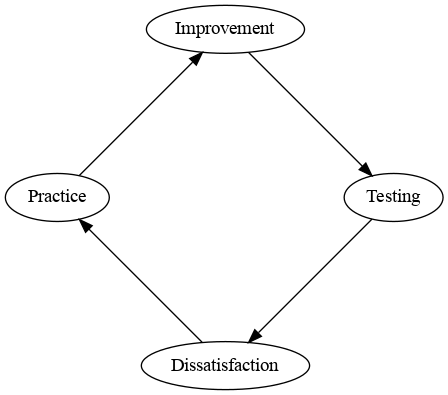
Research looks more convincing with a graph or chart. I’m going to create a cycle chart. Educational researchers love cycle charts. Here’s one I knocked up using Graphviz.

Dissatisfaction -> practice -> improvement -> testing

4: Test your Hypothesis

Split one of your classes in two halves. Test your hypothesis on one half, leave the other as a control group. If you don’t get the results you want, just ignore some of the students or swap them around between groups.

5: You’re going to need an Acronym

Think of a word. Some good words to use the basis for your acronym are VECTOR, INSPIRE and RAISE

I chose ERIC, as my friend is called Eric. Eric could stand for

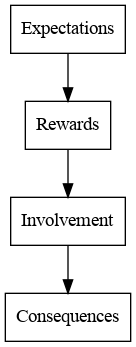
Expectations, Rewards, Involvement and Consequences.

That looks a bit boring, so here it is rewritten as a flowchart:

6: It must be true, I read it on a blog

Publish your research on your blog and then tweet what you’ve done. Retweet other people’s research in the hope that they return the favour.

Running Obsidian on a VirtualBox Windows 98 Image

My mother unearthed  a load of old  CD ROMs in her attic over Christmas.  She was a big fan of adventure games, in particular MYST and Obsidian, and she wanted to play them again.  The games won’t install on Windows 10, but there was an old Windows 98 installation disk amongst the CDs and so a solution presented itself.

  1. Install VirtualBox
  2. Create a Windows 98 Virtual Machine
  3. Install the games on the VM

I did the following on an old laptop (> 10 years) with Ubuntu installed. It should be no problem on a more modern machine.

Given the number of posts online by other people attempting to run Obsidian, I thought I’d share the process I followed.

Before You Start

  • Install VirtualBox. VirtualBox is free and open source. If you’re not familiar with it, there are lots of tutorials on the web.
  • You’ll need ISOs for Windows 98 and the games you want to use. As I already had the CDs, I created the ISOs using Brasero on Ubuntu.

Creating a Windows 98 VM

The following pages how to install Windows 98 on VirtualBox

Be aware, however, that most of the initial steps outlined were unnecessary: I simply chose install from CD. The Windows image formatted the C: drive for me, I didn’t have to insert a boot disk or fdisk the hard drive.

However, on booting up the VM, the following error occurred

While initializing device NDIS:
Windows Protection Error. You need to restart your computer.

This is due to the fact that modern machines are much much faster than those that Windows 98 used to run on.

I found a fix here: https://www.betaarchive.com/forum/viewtopic.php?t=24439.

You need to download the NDIS.VXD file (there’s a link in the article above) and copy it onto your virtual machine. I found it easiest to make a floppy image.

If you’re using Linux, you can make a blank floppy disk image with this command

mkfs.msdos -C /path/imagefile.img 1440

Mount the disk…

sudo mkdir /media/floppy1/
sudo mount -o loop /path/imagefile.img /media/floppy1/

… and then copy NDIS.VXD across to the C:\WINDOWS\SYSTEM\ folder of your Windows 98 image. Don’t forget to remove the floppy image or change your boot order when you’re done or you might find your image fails to boot (I wasted an hour before I realized my mistake!)

The above fix should mean that Windows 98 can now run. You’re not finished yet, however, as you’ll need to install video drivers. Go to the Configuring Video section on this link to find out how.

And that’s it, you’re done.  You can now install your games as normal. In my case the meant inserting the Obsidian disk 1 iso and then following the instructions (I’d forgotten about installing QuickTime, but there it is!)

Call me sad, but I enjoyed doing the above more than playing the actual games. It was also a buzz hearing the old Windows start up noise for the first time in years…

One last thought, the entire Win98 image is only about 175Mb.  It’s almost worth cloning it and having a clean install for each game.

bliss

I ripped my CD’s in the noughties.  Now they’re sat in the attic awaiting the collapse of civilisation. When the electricity stops working I can at least look at the covers and remember what music used to sound like.

In the meantime I can enjoy listening to my music wherever I like. Since I digitised my collection, however, I’ve never managed to keep it tidy.  I’ve tried various software to sort out my folders, eventually settling on Picard and Emacs. The trouble is, the collection always seems to grow faster than my attempts to tidy it.  

This weekend I gave up trying to manage it myself and installed bliss.  bliss audits your music collection according to a set of rules that you choose and then fixes any problems it finds.

By way of introduction, bliss fixes your cover artwork.  The software is very flexible, you can choose whether to embed the art into the individual music files, keep it separate or both, for example.

Here’s a picture of it in action:

Scanning Albums

You can choose from alternate covers if you want to match the art in your original collection.

Alertnate covers

Finding lost artwork is only the beginning. You can apply rules to do such things as fix genre or sort out your folder structure. Fixes can be applied manually or automatically, as below:

Fixing Genres

I’ve wasted a lot of time over the past few days just watching it work:

Scanning in action

What’s the catch? Well, not a catch as such, but you have to pay for bliss. It comes with 100 fixes, so that’s a 100 pieces of cover art installed for example.

11 Fixes left

You can buy more fixes but for a large collection you’re going to end up spending £59 or equivalent for unlimited fixes, and let’s face it, if you don’t have a large collection, you’re not going to need the software.

Is it worth it?  As a writer I believe that people should be paid for their creative endeavours however, full disclosure, bliss offer a the license free to people who blog about the software. But even if they didn’t, I’d pay the money.

Fifteen years of trying and failing to tidy my collection have proven to me it’s not going to happen any other way.

Find out more here: https://www.blisshq.com

12 Mince Pies

I’m not a superstitious person.  I walk under ladders and on the cracks in pavements.  I don’t knock on wood, I don’t throw salt over my shoulder and I can never remember whether black cats are good or bad luck.

About the only superstition I follow is one my mother told me when I was a child: that if you eat a mince pie on each of the twelve days of Christmas you’ll have good luck for the following year.  I only follow that superstition because I like mince pies and I’ve been pretty conscientious about maintaining it for that reason. In fact, I think the only time I’ve ever not eaten 12 mince pies over the Christmas season was last year, when I had the flu and I didn’t really feel like eating anything.

You may be pleased to know I made damn sure that I ate 12 mince pies this year.

You’re welcome.

ibuffer changed my life

I wanted a quick way to delete all the buffers that can accumulate in an Emacs session. A quick search threw up this post by Martin Owen.

It turned out all I needed was ibuffer mode. ibuffer has a toggle command which selects all unselected buffers.

But that’s not all. ibuffer will group your buffers by type, just like in the featured image for this post. It also comes with a range of commands for filtering buffers. Here are my five favourite commands:

  1. t to toggle files selected
  2. / . to filter by extensions
  3. / p to remove top level filter
  4. * h Mark all help buffers
  5. * s Mark all *special* buffers

and here’s my set up: I’ve basically just adapted Martin’s.

(global-set-key (kbd "C-x C-b") 'ibuffer) ; instead of buffer-list
(setq ibuffer-expert t) ; stop yes no prompt on delete

 (setq ibuffer-saved-filter-groups
	  (quote (("default"
		   ("dired" (mode . dired-mode))
		   ("org" (mode . org-mode))
		    ("magit" (name . "^magit"))
		   ("planner" (or
				(name . "^\\*Calendar\\*$")
				(name . "^\\*Org Agenda\\*")))
		   ("emacs" (or
			     (name . "^\\*scratch\\*$")
			     (name . "^\\*Messages\\*$")))))))

(add-hook 'ibuffer-mode-hook
	  (lambda ()
	    (ibuffer-switch-to-saved-filter-groups "default")))

It took me about ten minutes to do all the above from start to finish. Ten minutes well spent, I say.

Midway

Written on the road between the past and the future, a writer explores his relationship with his dying father.

Literature, fantasy and science fiction come together in this unique and very personal piece.

Buy on Amazon (paid link)| Apple Books

| Barnes and Noble | Buy on Kobo

Ballantyne’s moving, quietly profound stories present flawed human beings confronting the vicissitudes of life with varying degrees of success. Superb.

The Guardian 16/10/2020

‘Sharp, touching, and very original, this collection uses stories of different genres to explore aspects of the same emotional landscape, creating a very personal and very satisfying whole.’

Chris Beckett, winner of the Arthur C Clarke Award

My New Writing Regime

I have a new writing regime.

For years I used to head in Manchester city centre to write in coffee shops and the Portico Library. Nothing unusual about that, many writers do the same.

But then lock down came and I found myself sat at my computer doing the day job for hours on end. Writing took a back seat: the last thing I wanted to do in the evening was to go back to the keyboard. I needed to find a new way to work.

I think I’ve found it.

Now, when it’s a writing day, I put my notebook and iPad into my backpack and set off walking. If I get an idea I record it on my phone using Speechnotes. When I’m ready to write I find somewhere to sit, be it a cafe, bench, pub or a convenient rock, and begin to write on my iPad. I repeat the process until I’ve done at least 500 words and then I go home.  The system seems to be working.

Not only that, it’s made me realise something.

I’ve now been a professional writer for twenty something years. During that time I was always in a hurry to get somewhere to write a story. It’s only recently occurred to me that when I read other people’s stories I stop and look at the scenery.

So that’s my new regime. I find I’m spending less time on the writing and more time on enjoying the scenery. Does it make me a better writer? I don’t know. I’m certainly a more relaxed one.